Showing posts with label toolbox. Show all posts

The Introverted Author's Toolkit: Book Sites

Most writers are readers, after all, so stop and think for a moment about where you find books. Chances are, it wasn't from an advertisement you saw somewhere, but from a review, or a book site.

Amazon, of course, is the primary book retail site, but that's not the kind of site I'm focusing on with this post. I'm talking about "social" book sites where readers review and exchange recommendations. Keep in mind that the more places you're listed, the more ways readers can encounter your book.


Shelfari

We'll start out with Shelfari, because of its association with Amazon. Shelfari is like a Wikipedia of books. Each book has its own detailed information page, including character bios, quotes, settings/locations and more. If you set up your Shelfari account through your Amazon Author Central page, that extra info will show up on your book page. It's another chance to hook the reader with details from your story.

Readers can leave reviews, or add to your description of the book. (I have an email alert set to notify me if any changes are made to the page.)

You can also add a Shelfari widget to your blog, displaying your favorite books, or just your own titles.


Goodreads

The largest social book site is Goodreads. If you haven't already claimed your profile or added your books, you should. Their Author Program page has instructions for doing so. They accept any published authors, whether through a traditional publisher, or self-published.

I have twice as many reviews on Goodreads as I do on Amazon. It's a more socially intensive site, and authors are encouraged to engage in the book discussion boards. I've made a couple of tentative forays in that direction, but haven't fully committed to it. I'm told that it has the same effect as social media: engagement builds relationships with readers, who turn into your readers once they get to know you and get curious about your work.

Goodreads also has a feature which lets you upload samples of your work. Effective ways to use this feature include adding deleted scenes, and short stories from your books.

Trivia questions and quotes are another feature that can get your book noticed. Some users are avid trivia fans and the newer questions are bumped toward the top.

Goodreads giveaways are also very popular and get your book attention. The only restriction is that the giveaway book has to be a paper copy, not an ebook.

One thing that's very important to know about Goodreads is that there is a very strict system of author etiquette you are expected to follow. Ignore it at your peril.


LibraryThing

LibraryThing is a growing site, somewhat like a mixture of Shelfari and Goodreads. You can enter extra info on the book, such as character names, tags, your favorite reviews from other sites, first and last words, and a summary in haiku.

There are also discussion boards, featured authors, local events and giveaways.


AuthorsDB

AuthorsDB is like the IMDb of books. Add your bio, your links to all of your social media and retail sites, plus your books with cover and full summaries. You can also add book trailers, audio clips and documents to your entry.


Authorgraph (formerly Kindlegraph)

 Authorgraph is very simple site which allows you to send electronic autographs to readers. Upload your books with Amazon links. The autographs are sent to the reader as a PDF file they can attach to the book in the Kindle. You can sign using an iPad or similar touch-screen device and then save your signature to use on future requests, or (as I do) sign each time.


ManicReaders

ManicReaders is the only site among these that has a paid membership option with expanded benefits. The free version allows you to make an author page with bio, links, and picture, as well as the customary book page. You can also upload free samples or short stories. Another difference is that you can upload an ebook to the site so it's available for reviewers.

.-*-._.-*-._.-*-._.-*-._.-*-._.-*-._.-*-._.-*-._

I'm always on the look-out for more sites like these, so if you have any suggestions, please leave them in the comments.

The Introverted Author's Toolkit: Triberr

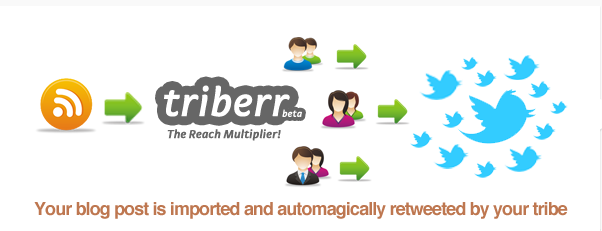
Triberr is called a "blog amplification service," and essentially, what that means is your blog posts will be shared over multiple social media networks by numerous sources.


Your blog's RSS feed sends it to Triberr and then your tribe mates share it on Twitter, Facebook, LinkedIn, StumbleUpon, and Google+.

It looks confusing at first, but it's actually very easy to use once you get it set up. This page gives you step-by-step instructions on how to get set up.

Every day, I check my "Tribal stream" page once or twice. It looks and works much like your Facebook page. (Well, without the cat pictures and TMI.)


This is my Triberr homepage, the "Tribal Feed." In the center, you see posts from my tribemates. I scroll through those and select the ones I want to share on my social networks. Generally, I select posts about indie authors, writing, new romance novels, etc. Things I think my Twitter and Facebook followers may enjoy.

I want you to notice something up in the corner:

That is the total number of people who are following the members of my tribe. That means, if every member of all of my tribes shared my post, it has the potential to be seen by over a million and a half people. Now, in reality, that doesn't happen, but I do get a decent number of shares.


The top post has been shared eighty-four times and the post below it has been shared sixty-eight times so far, and those numbers will increase a bit more over time as the stragglers catch up. Those posts are reaching people who wouldn't normally have seen my blog.

On this site, reciprocity counts.  You'll notice that people will be more willing to share your posts if you share theirs. Hovering over their icon will tell you how many times you've shared their posts.

Finding tribes can be done in two ways.

On the left side of your Tribal Stream screen, you'll see a search box below your stats. This is an example of a search for writing tribes.


Click on "Tribes" after you punch in your keyword. Browse though them to find one that looks promising. Make sure to check that they're still active.


Click on the orange "Follow" button on the right. This does not make you a member of the tribe. If you only "Follow" you will get their posts in your stream, but they will not get yours. You have to ask to join a tribe.

After you click "Follow," it will take you to a comment screen. Leave a comment there, asking to join the tribe.

Once you're already in some tribes, you have another way to search for them by using the "Discover" button on your menu bar.


You will be taken to a page where you can browse through tribes similar to the ones you're already in.


Use the blue arrows on the right to tab through the available tribes, and the orange "Follow" button to start the joining process.

When an invitation has been sent to you, it will appear as a blue dot beside your "Invites" button on the menu bar at the left. Accept the invitation, and you're in!

I strongly recommend this site for all of my introverted author friends. It's a great tool for spreading your blog posts, and getting new followers, without having to spam your social networks about your blog.